
A warehouse of guitar gear in the palm of your hand.
At this January’s massive NAMM music tech show in Los Angeles, six products won “best of show” awards. Several of them went to major music and electronic brands like Yamaha and Boss, but one of the six went to Neural DSP, a much smaller company started in 2017 by Chilean immigrants to Finland.
From its base in the Helsinki area, Neural has made itself an expert in the use of machine learning, robots, and impulse response technology to automate the construction of incredibly lifelike guitar amp modeling software. It quickly jumped into the top ranks of an industry dominated by brands like Universal Audio, Kemper, Line 6, and Fractal. For a hundred bucks, you could buy one of the company’s plugins and sound like a guitar god with a $10,000 recording chain of amps, cabinets, effects pedals, and microphones.
In 2020, Neural branched out into hardware, putting its tech not in your computer but in a floor-based box covered with footswitches and called the Quad Cortex. While the company’s plugins could each replace one entire pedalboard of gear—plus a few amps and cabs—the Quad Cortex could replace a Guitar Center-sized warehouse of devices, offering hundreds of amps, cabs, and effects.
How was this possible? High-quality gear models used to take much longer to build; the best were often built by modeling every single component of the underlying circuit. Machine learning offered a faster way, one that didn’t care about the circuit at all. What it cared about was the input signal (which was known) and the output signal (which contained all the changes imposed on the signal by the circuit, the speaker, the cabinet, and/or the mic in question). A computer could then calculate what the device was doing to the signal without knowing anything about “how it worked.”
But this kind of modeling still took time, because each “capture” was a static picture of one particular setting. When you imagine the millions of possible setting combinations (tone, bass, treble, drive, EQ, etc.) on even a single guitar amp, you can see that building complex models of beloved gear could be slow.
In 2024, Neural announced that it had sped up this process using a robot called TINA. The company hooked TINA’s robotic actuators up to the various controls on some piece of gear it wanted to model, and TINA would do the tedious work of spinning the knobs and recording a new capture at each knob position. (Neural claimed that it typically recorded “thousands of control positions” per device this way.)
A neural network then built a model of how the target device behaved at each recorded setting, though the model would “also generalize and precisely infer the sound of the device in any unseen control setting and input signal.” The result was not a single model of a static setting but a dynamic model that could act on parameter changes just like the original device.
Neural has now modeled a massive library of gear, much of which comes with the Quad Cortex. That device sounds great, though it is still relatively chunky and nearly $2,000.
This year, Neural built on that success with the Quad Cortex mini, which shrinks the device size in half, cuts the footswitches to four, and lowers the price to $1,400—but still offers the full processing power of its larger sibling. This is the device that won a “Best in Show” award at NAMM.
As an enthusiastic amateur guitarist for many years, I got my start with digital amp sims through a Digidesign RP-6 pedalboard from the 1990s. And though it had “S-DISC PROCESSING!” it never sounded particularly realistic, especially with distortion effects. More recently, since I record rather than gig, I’ve spent my time getting to know the software side of the amp modeling business.
But when Neural offered to loan me a review unit of the Quad Cortex mini, I was quite curious to see just what top-tier hardware units can do today.
The Quad Cortex mini in its natural habitat: surrounded by cables.
The Quad Cortex mini in its natural habitat: surrounded by cables. Credit: Nate Anderson
The glass, metal, and steel Quad Cortex mini is about the size of two bricks laid side by side (8.9×4.6×2.5 inches or 22.8×11.8×6.5 cm), and its 3.3 lbs (1.5 kg) give it a satisfying heft. It looks and feels premium—this is a well-built piece of gear.
Though it is meant to operate a bit like traditional analog stomp boxes that guitar and bass players have long used, it may be more helpful to think of the Quad Cortex mini as a chunky handheld computer that you can just so happen to use on the floor.
It runs its own operating system (CorOS), takes a whopping 45 seconds to boot, has Wi-Fi for over-the-air updates and cloud service connectivity, features a 7-inch touchscreen, and comes with a “CPU monitor” to show you just how unhappy its chipset is about that third reverb you added to a patch. It even contains a full-on monosynth that you can add to guitar patches, providing control over four full pages of synth parameters, including the raw oscillators.
So finger-focused is the unit that you can tweak just about any parameter on the device with either the touchscreen controls or the footswitches, which double as twistable rotary encoders.
If the top face of the Quad Cortex mini is devoted to a screen and switches, the sides are all about inputs and outputs. You get a “locking” power connector (so the cord doesn’t pull out on stage, prematurely ending your soaring 10-minute guitar solo mid-note) along with a whole host of audio connectors: guitar/bass input, XLR input with phantom power, balanced XLR outputs, TRS send/return ports, stereo line outs, MIDI in and out, an expression pedal port, a USB-C port, and a headphone jack.
Finally, there’s the “capture out” port, which is used to send a series of test signals through various kinds of audio gear to generate a machine learning-based model of various amps, cabinets, and pedals.
The “capture” port is another reminder of the way in which this kind of modern modeling gear is not just an updated version of old-school stomp boxes. The Quad Cortex mini does let you plug in your guitar and rock out, sure, but it also performs and processes hardware captures (both on the device and—for more sophisticated modeling—in the cloud) and can operate as a 16-channel USB-C audio interface to your computer. And though it’s largely designed for guitars and basses, you can use it on anything. The unit even has a few voice presets, which sound pretty wild with some of the real-time pitch-shifting and reverb effects.
While you can model your own gear collection with the Quad Cortex mini, the device itself comes with more than 90 amp models, more than 100 effects, and over 1,000 cabinet impulse responses. It can also run versions of the company’s desktop plugins (assuming you’ve purchased them already). It also comes with “over 2,000 high-quality factory Neural Captures” of other gear—these are static captures—and it can connect to the free “Cortex Cloud” service to download even more, including those uploaded by other users.
In other words: This one box holds digital representations of several hundred thousand dollars of gear. And given that you can mix and match cabs, captures, amps, and effects in wildly complicated chains that can even split and merge… the possibilities are functionally limitless.
Whether that excites or paralyzes you may depend on your own psychology, but it’s quite a change from how Neural DSP has approached its plugin offerings. Neural has generally offered curated (read: limited) collections of amps, cabs, and effects bundled into plugins that represent the tone of, say, John Mayer. You might get 3 amps, a few cabinets recorded with various mics, a few pedals, and an EQ, reverb, and delay, all in a gorgeous interface with some great presets.
But boxes like Quad Cortex mini take a “more is more” approach, with unlimited gear-mixing potential, captures, and storage for thousands of presets. Curation? Bah, who needs it? Here’s everything!
This much gear also means that “gorgeous bespoke interface graphics” are out the window; you will get no pictures of sexy amps sitting in sexy studios with sexy lighting, as you do in the company’s gorgeous plugins. Instead, you will get flat rectangles. So many flat rectangles.
CorOS is one of those places where skeuomorphism goes to die. The Quad Cortex mini interface is extremely “functional”—I am trying to avoid more negative terms, because it has a certain “alpha phase before we put the final art in” charm—and is based entirely around grids of flat rectangles.
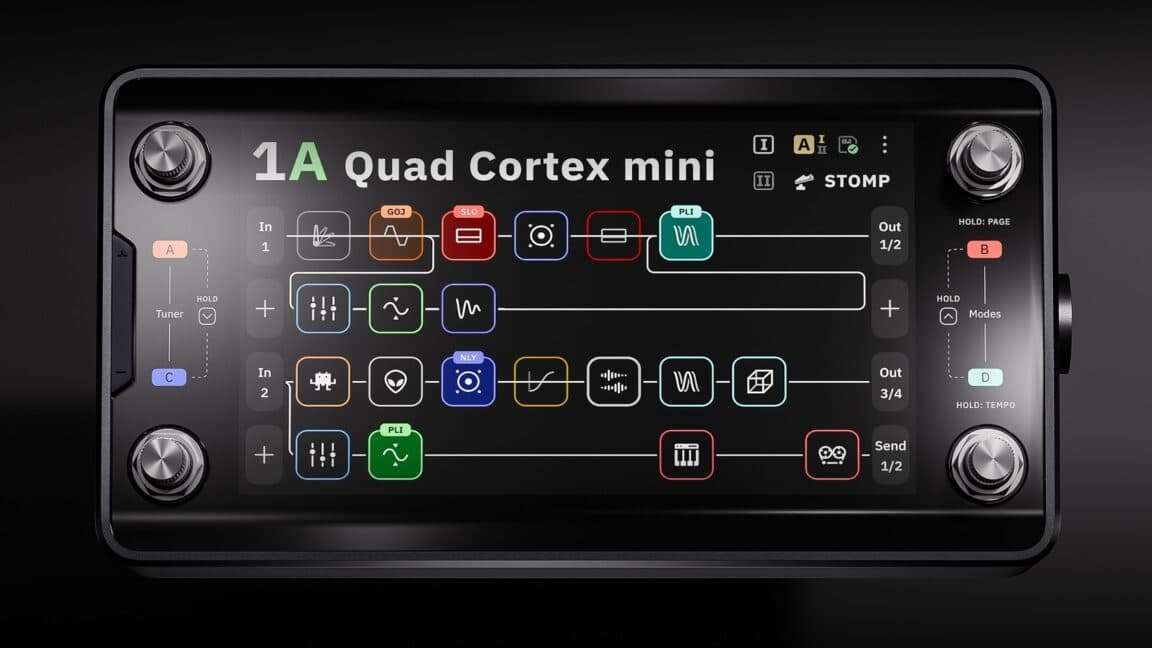
The main screen is called, in fact, “the grid.” It shows your current effect chain as a series of small squares, each filled with often impenetrable line art. (A disturbing number of these are some variation on a squiggly line. Fortunately, they are color coded by effect type.)
Each square represents a different effects processor, and you can have four lines of eight effect squares each. That might sound like a lot (and it is), but the processors can be distributed across the grid in creative ways.
Preset 47B, for instance, is called “Annoying Flute,” and it makes use of all four grid lines by running the input signal through a VCA compressor, a gate, an octave pitch shifter, an envelope filter, an EQ, the “Neural Capture” of an amp called “Custom 3SE 2,” and then a “112 US DLX Black C12K 00s (M)” speaker cabinet. (The names of these things are often hard to read at a glance, especially when picking from a list of a hundred items.)
This accounts for only “line 1” of the grid. In the case of Annoying Flute, the signal chain branches right after the speaker cabinet. Half of it continues on to line 3 of the grid, while the other half is routed down to line 2, where it passes through a pair of tape delays before also heading off to line 3. Line 3 receives this re-combined signal and splits it again, this time passing half of it through a poly octaver and another digital delay on line 4 before everything runs through a modulated reverb on line 3 and then onwards to the outputs.
Does this sort of craziness sound good? Well, it sounds better than anything featuring three delays, two pitch shifters, and the name “Annoying Flute” has any right to! But I bring this example up to illustrate the creative routing and effects decisions that the grid makes possible.
And things get even crazier when you use the built-in looper, trigger analog send/return effects, and set up your effects chain with other units meant to be switched on and off during a song.
So much for assigning effects rectangles to the rectangular grid. How to control all of these virtual gadgets? When you tap on any effects unit, up pops an overlay containing (you guessed it) lots of rectangles.
Every controllable parameter gets a rectangle, which is usually filled with a dial or a switch. You can change the values of these dials and switches by touching the screen or by twisting the lower-right rotary footswitch.
Sometimes there are multiple pages of such parameters; the blossom reverb, for instance, has two pages of options and lets you control everything from ducking to pre-delay to modulation to the length of the early reflections. Configuring an entire audio chain from scratch can therefore take a while if you’re a detail freak.
Gig Mode. Yup, it’s rectangles! Credit: Nate Anderson
When you have your grid setup exactly how you like it—or you’ve customized one of the many built-in presets—you can save your own custom presets and organize them in all sorts of performance-oriented ways.
There’s PRESET mode, which lets you stomp each of the four footswitches to select a completely different preset.
There’s SCENE mode, which lets you use the footswitches to instead choose different parameter sets within the same preset—such as adding a hall reverb, upping the amp gain, and boosting the delay mix level when you come to your big solo.


