
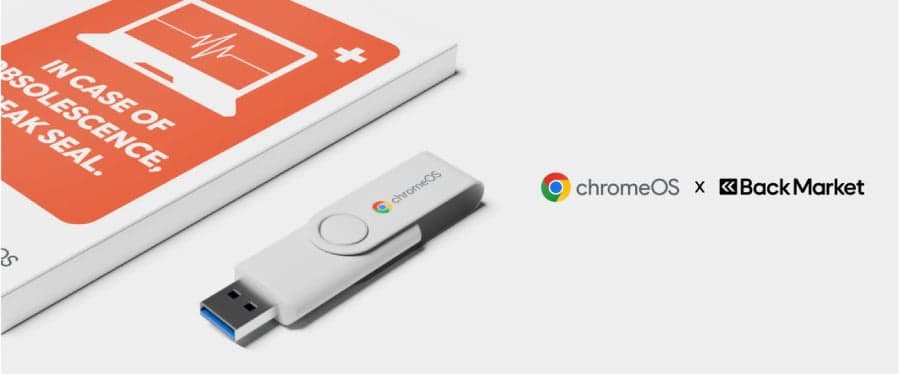
With Microsoft’s October 2025 deadline for Windows 10 support looming, an estimated 500 million users worldwide face a stark choice: upgrade to Windows 11—often requiring expensive new hardware—or continue using computers that will no longer receive critical security updates. Google and Back Market have stepped in with a third option that promises to extend the life of aging laptops and desktops at minimal cost. For just $3—available in U.S. dollars, euros, or British pounds—the two companies are offering a ChromeOS Flex USB Kit that transforms unsupported PCs into fast, cloud-first machines, complete with step-by-step guides and video tutorials to ease the transition. While the ChromeOS Flex software itself has been freely downloadable for years, the new physical kit targets non-technical users who want a hassle-free way to breathe new life into their old devices without spending hundreds on replacements or risking cybersecurity vulnerabilities.
This initiative arrives at a critical inflection point for consumer technology. Windows 10, first released in July 2015, reached its official end-of-life on October 14, 2025, after a decade of widespread adoption across homes, schools, and small businesses. Microsoft had previously extended free support through October 2025 due to global semiconductor shortages and supply chain disruptions, but that lifeline has now expired. For millions, the operating system’s discontinuation means more than just missing out on new features—it means exposure to unpatched vulnerabilities that cybercriminals increasingly target as operating systems age. Google’s ChromeOS Flex, built on the same open-source Chromium OS foundation as its consumer Chromebooks, offers a lightweight, secure alternative that relies on web-based applications and cloud storage, reducing strain on aging hardware.
How the $3 ChromeOS Flex USB Kit Solves the Windows 10 EOL Crisis
A Plug-and-Play Lifeline for Obsolete Hardware
The ChromeOS Flex USB Kit is a compact, bootable flash drive preloaded with the ChromeOS Flex operating system. Users insert the drive into their unsupported PC, restart the device, and boot into ChromeOS Flex via a simple menu. The process takes under 10 minutes to complete and requires no technical expertise. Google and Back Market have included printed guides and QR codes linking to video tutorials in multiple languages, ensuring accessibility across diverse user groups. Unlike Windows 11, which demands modern processors (including TPM 2.0 support) and at least 4GB of RAM, ChromeOS Flex can run on hardware from as far back as 2007, including older Intel Core 2 Duo systems.
This low barrier to entry is particularly vital for students, educators, and low-income families who cannot afford $500-plus laptops. According to a 2024 Pew Research Center survey, nearly one in five American adults relies on a device older than five years for essential tasks like schoolwork and job applications. With inflation still elevated and household budgets strained, the $3 kit represents not just a technological upgrade, but a socioeconomic lifeline. Back Market, a global leader in refurbished and certified pre-owned electronics, handles fulfillment, ensuring the kits are shipped with eco-friendly packaging and carbon-neutral logistics.
Security Without the Overhead
One of the most immediate benefits of switching to ChromeOS Flex is security. Microsoft’s end of support means no more security patches, bug fixes, or software updates for Windows 10, leaving machines vulnerable to exploits such as ransomware, spyware, and phishing attacks. ChromeOS Flex, by contrast, receives automatic updates directly from Google’s cloud infrastructure, ensuring that protection mechanisms evolve alongside emerging threats. The OS uses a verified boot process and sandboxing to isolate applications, reducing the attack surface even further. For organizations like schools and libraries, where IT budgets are limited, ChromeOS Flex offers a cost-effective path to compliance with cybersecurity standards.
However, it’s important to note that ChromeOS Flex does not support all Windows applications. Users running legacy software—such as older versions of Adobe Photoshop, QuickBooks, or niche business tools—will need to find cloud-based alternatives or run them through virtualization, which may not be feasible on underpowered hardware. Google acknowledges this limitation in its support documentation, recommending ChromeOS Flex primarily for users whose workflows center on web browsing, email (via Gmail or Outlook Web), streaming services, and Google Workspace applications.
Why This $3 Kit Matters: Economic and Environmental Impact
- Saves households and businesses hundreds of dollars by avoiding forced hardware upgrades
- Reduces global e-waste by extending device lifespans by 3–5 years on average
- Lowers carbon emissions by cutting demand for new device manufacturing, which accounts for up to 80% of a laptop’s lifetime environmental footprint
The environmental implications of this initiative are profound. The global electronics industry generates over 61.3 million metric tons of e-waste annually, according to the Global E-waste Monitor 2024—a figure larger than the weight of the Great Pyramid of Giza. Many of these discarded devices contain hazardous materials like lead, mercury, and cadmium, which can leach into soil and water supplies if not properly recycled. By enabling users to repurpose existing hardware, ChromeOS Flex helps divert millions of laptops from landfills each year. Google estimates that extending the life of a single laptop by three years reduces its carbon footprint by approximately 19%, equivalent to avoiding the emissions of driving 1,000 miles in a typical passenger vehicle.
The manufacturing process of a new laptop is responsible for a large part of its carbon footprint. ChromeOS Flex allows the already-manufactured device to be used for longer, which keeps hardware out of landfills and avoids the emissions of making a new device. This isn’t just about prolonging the life of a device—it’s about changing how we think about technology consumption in the 21st century.
Who Should—and Shouldn’t—Use ChromeOS Flex
Ideal Users: Lightweight, Web-Centric Workflows
ChromeOS Flex shines brightest in environments where computing needs are simple and internet-based. This includes students completing assignments via Google Classroom, remote workers using Zoom and Google Meet, email users managing Outlook or Gmail, and casual users streaming Netflix or YouTube. The OS boots in under 10 seconds, runs smoothly on devices with as little as 2GB of RAM, and integrates seamlessly with Google Drive, Docs, Sheets, and Slides. For families managing shared devices, ChromeOS Flex offers robust parental controls and multi-user profiles, making it easier to maintain digital hygiene across household members.
Not a Fit For: Power Users and Legacy Software Dependencies
Professionals who rely on specialized Windows software—such as CAD programs, video editing suites, or database applications—will find ChromeOS Flex limiting. While Google continues to expand Linux app support on ChromeOS Flex (via Crostini), performance on older hardware may still be sluggish, and compatibility issues persist with proprietary Windows formats like .exe files. Gaming is another area where ChromeOS Flex falls short; it does not support native PC gaming or popular titles like Fortnite or Steam. Users who frequently work offline or require local file storage may also face challenges, as ChromeOS Flex prioritizes cloud synchronization and web-based applications.
Behind the Scenes: How Google and Back Market Are Rolling Out the Kit
The ChromeOS Flex USB Kit is currently available as a pilot program in select markets, including the United States, United Kingdom, Germany, France, and Japan. Back Market, which operates a platform connecting buyers and sellers of refurbished electronics in over 170 countries, is handling all aspects of fulfillment, from inventory management to customer support. Google has not disclosed exact production volumes, but the company has indicated that scalability will depend on demand during the pilot phase, which runs through Q1 2026. Users can purchase the kits directly from Back Market’s website or through authorized retail partners.
The collaboration between Google and Back Market underscores a growing trend in the tech industry: the convergence of sustainability, affordability, and digital inclusion. Back Market CEO Thibaud Hug de Larauze emphasized the strategic importance of the partnership in a recent interview, stating, “We’re not just selling refurbished tech—we’re redefining how people access computing power. This kit makes cloud-first computing accessible to everyone, not just those who can afford the latest devices.” Google’s ChromeOS team, led by Vice President of Product Manan Shah, sees the initiative as part of a broader push to democratize technology while reducing its environmental impact. Shah noted, “Our goal is to ensure that no one is left behind as operating systems evolve. ChromeOS Flex is about giving users agency over their devices—and their data.”
The Broader Implications: A Shift in How We View Technology Upgrades
The launch of the ChromeOS Flex USB Kit signals a potential paradigm shift in how consumers and institutions approach technology obsolescence. Historically, the tech industry has relied on planned obsolescence—designing products with limited lifespans to encourage frequent upgrades. However, mounting pressure from environmental advocates, regulators, and consumers has pushed companies toward more sustainable models. The European Union’s Right to Repair legislation and France’s repairability index are examples of policies encouraging longer device lifecycles. In this context, initiatives like ChromeOS Flex offer a viable alternative to the throwaway culture that has dominated electronics for decades.
The financial incentive is equally compelling. A mid-range Windows laptop costs between $400 and $800, while a refurbished model in good condition can often be found for under $200. By spending just $3 on a ChromeOS Flex kit, users effectively turn a $200 investment into a functional device for years to come. This represents a 98% cost savings compared to purchasing a new system. For educational institutions, nonprofits, and small businesses operating on tight budgets, such savings can free up resources for other critical needs, such as curriculum development or service expansion.
Key Takeaways: What You Need to Know About the ChromeOS Flex USB Kit
- The $3 ChromeOS Flex USB Kit is a plug-and-play solution for Windows 10 users facing end-of-life security risks, requiring no technical expertise to install.
- The kit supports hardware as old as 2007, making it ideal for low-income families, students, and organizations with limited IT budgets.
- ChromeOS Flex improves security through automatic cloud updates and sandboxed applications, reducing exposure to cyber threats.
- Environmental benefits include up to 19% lower energy consumption and significant reductions in e-waste and carbon emissions.
- The initiative is currently a pilot program with limited availability, but demand may drive broader rollout in 2026.
What’s Next: Availability, Scalability, and Long-Term Impact
As the pilot phase progresses, Google and Back Market are closely monitoring user feedback and technical performance. Early adopters have reported high satisfaction rates, particularly among educators and remote workers who value reliability and ease of use. However, Google has cautioned that the kit may not be suitable for all use cases, especially those requiring legacy Windows applications. In response, the company is exploring partnerships with virtualization platforms like Parallels to offer limited Windows app compatibility in the future.
Scalability will depend on several factors, including supply chain stability for USB drives, global demand, and potential government incentives for e-waste reduction. Back Market has committed to sourcing refurbished drives where possible to further lower the environmental impact of the kits. If the pilot succeeds, Google may expand the initiative to include additional regions and languages, potentially offering bulk discounts for schools and nonprofits.
Frequently Asked Questions
Frequently Asked Questions
- Can I install ChromeOS Flex on any old Windows PC?
- ChromeOS Flex can run on most PCs manufactured after 2007 with at least 2GB of RAM and a 16GB storage drive. However, it does not support devices with ARM processors or those running very old BIOS systems. Google provides a compatibility checker tool on its website to verify if your device is suitable.
- Will ChromeOS Flex work with my printer, scanner, or other peripherals?
- ChromeOS Flex supports most standard peripherals via USB or wireless connections, including printers, keyboards, and webcams. However, you may need to install drivers manually for some older devices. Google’s support page offers a list of tested peripherals and troubleshooting tips.
- Can I dual-boot ChromeOS Flex with Windows 10 to keep both options open?
- Yes, ChromeOS Flex can be installed alongside Windows 10 in a dual-boot configuration, allowing you to choose which operating system to use at startup. However, this requires repartitioning your hard drive and may void warranties on refurbished devices. Google recommends backing up all data before proceeding.


