
Nintendo’s Switch 2 has arrived, promising crisper visuals, faster load times, and a suite of new features designed to enhance both solo and multiplayer gaming. While the console itself delivers a substantial upgrade over its predecessors, the real magic often lies in the accessories that transform it from a standard handheld into a premium gaming powerhouse. Whether you're a competitive gamer seeking precision controls, a parent looking to introduce kids to physical activity through motion-based games, or a traveler wanting to game comfortably in the car, the right add-ons can redefine your experience. From Nintendo’s official Pro Controller to third-party innovations like sports bundles and car mounts, these gadgets address long-standing criticisms of the Switch ecosystem—such as Joy-Con drift and ergonomic discomfort—while unlocking new creative and social possibilities.
Why Accessories Matter for the Nintendo Switch 2: Comfort, Performance, and Play Style Upgrades
The Nintendo Switch 2 inherits the original’s hybrid design—a console that seamlessly transitions between handheld and docked modes—but Nintendo has expanded its ecosystem to cater to a broader audience. While the base model offers impressive hardware, accessories play a pivotal role in addressing common pain points and unlocking the system’s full potential. For instance, Joy-Con drift—a notorious issue plaguing earlier models—has been mitigated through hardware improvements, but comfort during extended play sessions remains a challenge for many users. Third-party controllers and ergonomic grips provide solutions, while motion-based accessories like the Tokluck Sports Bundle encourage active play, blending gaming with physical activity.
The Evolution of Switch Accessories: From Necessity to Innovation
When the original Nintendo Switch launched in March 2017, it revolutionized portable gaming with its hybrid design. However, its early accessories were often reactive—solutions to problems like fragile Joy-Cons or underwhelming docks. Over time, the market matured, with companies like Nintendo and third-party manufacturers introducing products that didn’t just fix flaws but enhanced the experience. The Switch 2 builds on this evolution, with accessories now designed to complement its advanced features, such as improved motion controls, 4K output, and USB-C connectivity. This shift reflects a broader trend in gaming: accessories are no longer optional upgrades but integral components that define how we interact with our devices.
Top Nintendo Switch 2 Controllers: Ergonomics, Precision, and Versatility
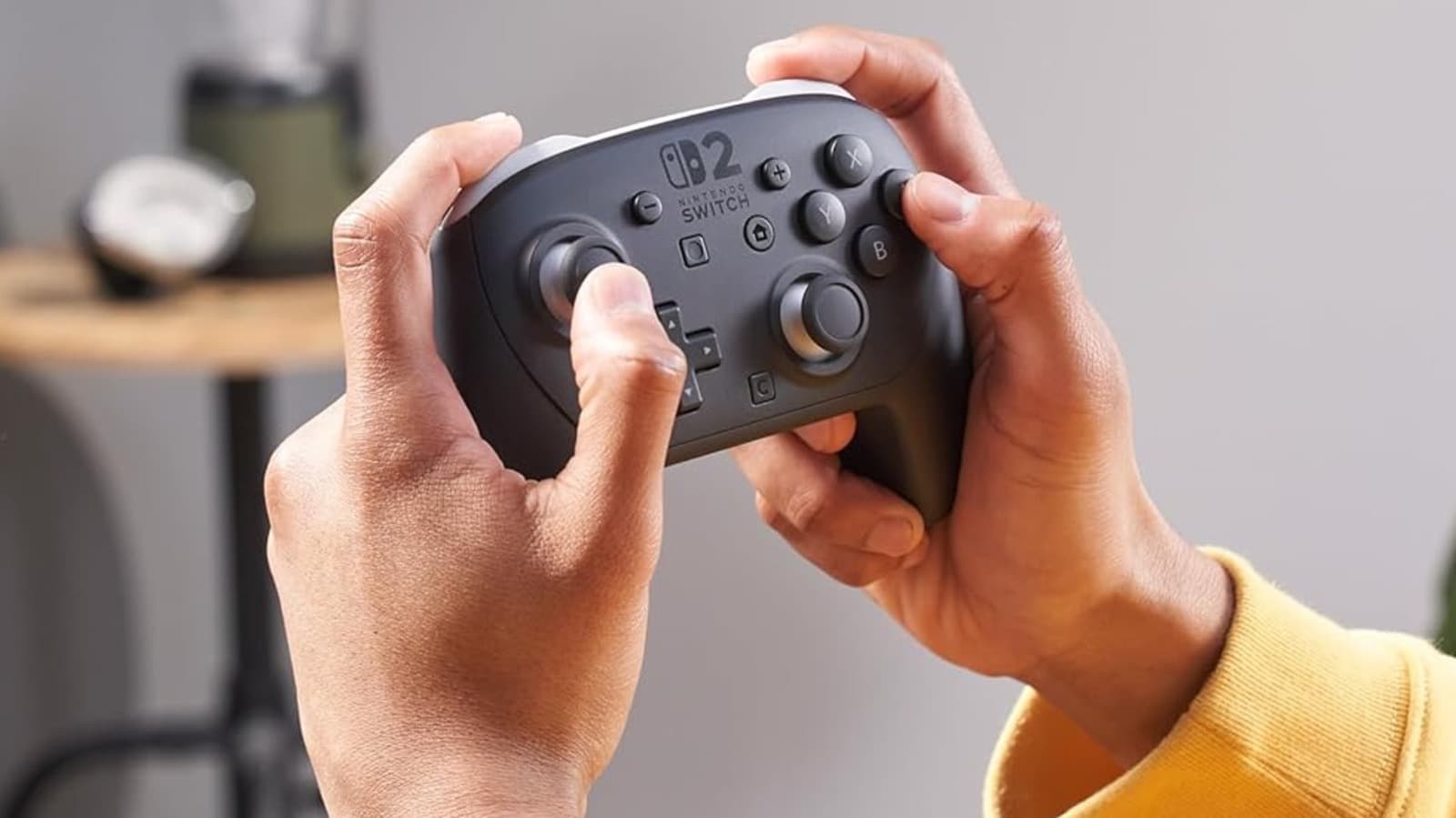
For players who log long hours or prioritize precision, a dedicated controller is a game-changer. The Nintendo Switch 2 Pro Controller stands out as the gold standard, offering a balance of comfort, performance, and compatibility with the console’s new features. Priced at $89, it’s a significant investment but one backed by overwhelmingly positive reviews. With over 1,900 Amazon ratings, it boasts a 4.8-star average and a 97% satisfaction rate among users. Reviewers consistently highlight its responsive HD Rumble 2 feedback, seamless amiibo integration, and motion controls, which align perfectly with the Switch 2’s enhanced sensor capabilities.
“The Switch 2 Pro Controller feels like a natural extension of the console itself—every button press is crisp, and the ergonomics are a massive upgrade over the Joy-Cons. Even after hours of play, my hands don’t cramp up.” — Amazon verified purchaser
The controller’s design caters to a wide range of hand sizes, a common complaint with the original Joy-Cons. While some users with sweaty palms note that a silicone skin improves grip, the overall consensus is that the Pro Controller just works. Its capture button, audio jack, and compatibility with the Switch 2’s USB-C port further solidify its place as the go-to accessory for serious gamers. That said, it’s worth noting that third-party controllers, while often cheaper, may lack full feature parity, particularly with motion controls or HD Rumble.
Beyond the Pro Controller: Third-Party Alternatives and What to Consider
For budget-conscious gamers or those seeking specific features, third-party controllers like the 8BitDo Pro 2 or Razer Wolverine offer compelling alternatives. These controllers often include additional programmable buttons, customizable RGB lighting, and longer battery life. However, they may not support the Switch 2’s new motion sensors or capture functionality out of the box. Compatibility issues can arise, especially with firmware updates, so research is essential before purchasing. Additionally, while these controllers are typically priced between $50 and $70, their build quality and longevity vary widely—something reflected in user reviews that often mention inconsistent button responsiveness or flimsy thumbsticks.
Enhancing Multiplayer and Streaming: Cameras and Social Features for the Switch 2
One of the Switch 2’s most talked-about additions is its expanded camera functionality, which Nintendo has positioned as a key selling point for social and creative gaming. The Nintendo Switch 2 Camera, priced at $54, plugs directly into the console’s USB-C port and enables features like CameraPlay and GameChat—tools that let players integrate their real-time video feeds into games. For fans of titles like *Mario Kart World* or *Super Mario Party Jamboree*, this accessory adds a layer of immersion and personalization that was previously impossible on the Switch platform.
How the Official Camera Stacks Up Against Third-Party Options
Nintendo’s official camera is designed to work flawlessly with the Switch 2’s software, ensuring minimal latency and broad compatibility with future titles. It currently holds a 4.5-star rating on Amazon, with 86% of over 200 reviewers awarding it four stars or higher. Users praise its plug-and-play setup and the joy of seeing themselves integrated into gameplay, though some note that the 1080p sensor feels slightly dated compared to dedicated webcams. Third-party USB-C cameras, such as the Logitech C920x, offer higher resolutions and better low-light performance but may require manual configuration in the Switch 2’s settings. For casual streamers or party gamers, the official camera strikes the best balance between convenience and performance.
Active Gaming Meets Accessories: Sports Bundles and Motion-Controlled Fun
Nintendo Switch Sports, a staple of the original console’s library, takes center stage with the Switch 2, thanks to its enhanced motion controls and improved tracking. To amplify the physicality of games like golf, tennis, or sword fighting, the Tokluck Switch 2 Sports Accessories Bundle ($28.99) provides an all-in-one kit with clubs, rackets, swords, and securing straps. The bundle, which has earned a 4.5-star rating from over 1,700 Amazon users, is an Amazon’s Choice pick and particularly popular among parents looking to blend gaming with physical activity.
Safety and Practicality: What to Watch Out for in Motion Accessories
While the Tokluck bundle excels in providing an immersive experience, it’s not without risks. Approximately 4% of reviewers reported issues with fit, including accessories detaching mid-game and flying toward screens—a hazard that led to costly repairs for some users. To mitigate this, Nintendo recommends using the included rubber bands to secure controllers tightly and always playing in a safe, open space. Despite these caveats, the bundle’s affordability and versatility make it a standout for families and groups seeking a dynamic gaming experience. For older kids or competitive players, investing in higher-end motion accessories, such as the SteelSeries Stratus+ for Switch 2, may offer better durability and precision.
Gaming on the Go: Car Mounts and Travel-Friendly Solutions
The Nintendo Switch 2 is built for portability, but long road trips can turn handheld gaming into a neck-straining ordeal. Enter the FYOUNG Car Headrest Mount ($13.99–$16.99), a simple yet effective solution that attaches to a vehicle’s headrest and supports screens between 4 and 11 inches. Its 360-degree rotation and adjustable viewing angles make it compatible with the Switch 2 (with or without Joy-Cons) as well as tablets and phones. The mount boasts a 4.6-star rating from over 2,800 Amazon users, with 90% giving it four stars or higher, and is an Amazon’s Choice product.
Comparing Car Mounts: FYOUNG vs. Lamicall for Enhanced Comfort
For those willing to spend more for added stability, the Lamicall Car Headrest Tablet Holder ($24.99) offers double the price but triple the reviews (over 9,900 on Amazon) and a 4.5-star average. Its wider clamp and reinforced build are designed to handle larger devices, making it ideal for passengers who prefer a tablet-sized screen. Both mounts address a common frustration among road-trippers: the need for a flexible, non-distracting way to enjoy Switch 2 games without craning their necks. However, users should ensure their vehicle’s headrests are compatible, as some aftermarket or adjustable headrests may not fit securely.
Transforming Your Setup: Docking Stations, Lighting, and Aesthetic Upgrades
For gamers who prefer the Switch 2’s docked mode, the POWKING Switch 2 TV Dock ($99.99) offers more than just a charging hub—it’s a statement piece. Designed to output 4K at 60fps, the dock features a built-in fan to prevent overheating and two stems that can charge up to four controllers in three hours. Some users have pushed its limits, successfully charging six controllers by placing two on the unit itself. Its whimsical design, which includes decorative elements, makes it a conversation starter for gaming setups, earning it a 4.5-star rating from over 240 reviewers.
“This dock isn’t just functional—it’s a conversation piece. The built-in LED lighting and sleek design make my gaming station feel like a premium setup. The only downside? No Ethernet port, which is a bummer for stable online play.” — Amazon reviewer
Official vs. Third-Party Docks: What’s the Trade-Off?
Nintendo’s official dock for the Switch 2 retails for $129.99 and includes an Ethernet port for wired internet, a feature the POWKING dock lacks. While the official option is pricier, it guarantees full compatibility with the console’s power delivery system and accessories. Third-party docks like POWKING often prioritize aesthetics and additional features (e.g., RGB lighting) but may struggle with heat dissipation or controller charging speeds. Durability is another concern: approximately 6% of POWKING users reported charging failures or build quality issues, highlighting the importance of purchasing from reputable sellers and checking warranty policies.
Key Takeaways: How to Choose the Best Nintendo Switch 2 Accessories
- The Nintendo Switch 2 Pro Controller ($89) is the top choice for serious gamers, offering unparalleled comfort, precision, and compatibility with the console’s new features.
- For social and streaming gaming, the official Nintendo Switch 2 Camera ($54) provides seamless integration, though third-party USB-C cameras may offer higher resolutions for casual users.
- Motion-based accessories like the Tokluck Sports Bundle ($28.99) enhance active gameplay but require careful setup to avoid damage to screens or controllers.
- Car mounts such as the FYOUNG ($13.99–$16.99) and Lamicall ($24.99) solutions ensure comfortable gaming on the go, with the latter ideal for tablet-sized displays.
- Third-party docks like the POWKING ($99.99) prioritize design and extra features but may lack the stability and Ethernet port of Nintendo’s official dock ($129.99).
Frequently Asked Questions About Nintendo Switch 2 Accessories
Frequently Asked Questions
- Are third-party controllers fully compatible with the Nintendo Switch 2?
- Third-party controllers may lack full feature parity with Nintendo’s Pro Controller, particularly for motion controls and HD Rumble. Always check compatibility lists and user reviews before purchasing.
- Can I use a USB-C webcam with the Nintendo Switch 2 for streaming?
- Yes, the Switch 2 supports USB-C cameras, but compatibility varies. Test your camera in the console’s System Settings or opt for Nintendo’s official camera to ensure seamless integration.
- Is the POWKING dock safe for continuous use during long gaming sessions?
- The POWKING dock includes a built-in fan to manage heat, but some users report durability issues. Monitor temperatures during extended use and consider the official dock if heat management is a priority.


